Voice Access App: Enabling Hands-Free Digital Interaction
In an era where smartphones and computers are central to everyday life, the way we interact with technology continues to evolve. One of the most remarkable frontiers in human-computer interaction is voice-based control — and at the forefront of this revolution are voice access apps. These applications transform speech into commands, offering users hands-free access to devices and digital content. While voice assistants such as Siri, Alexa, and Google Assistant are mainstream, voice access apps are specialized tools focused on deep system navigation and control using voice alone. They redefine accessibility, productivity, and convenience.
What Is a Voice Access App?
A voice access app is software that allows a user to control a device — typically a smartphone, tablet, or computer — using voice commands rather than touch, keyboard, or mouse input. Unlike basic voice assistants that respond to simple queries (e.g., “What’s the weather?”), voice access apps provide granular control over the interface:
- opening apps,
- tapping buttons,
- scrolling,
- typing text,
- navigating menus,
- selecting items, and
- performing complex tasks without physical touch.
In essence, voice access apps aim to give users full device control through voice alone.
History and Context
Voice interaction isn’t new. Systems like Dragon NaturallySpeaking (released in the 1990s) began the shift toward speech recognition for computing. With the rise of smartphones, voice assistants emerged — but often with limited control over device UI.
The desire for a deeper solution, particularly for people with physical disabilities or motor impairments, led to the development of voice access applications. These tools evolved with advancements in natural language processing (NLP), machine learning, and mobile computing power.
How Do Voice Access Apps Work?
Voice access apps rely on a pipeline of technologies:
1. Speech Recognition
At the core is Automatic Speech Recognition (ASR) — converting spoken words into text. Modern systems use AI models trained on massive voice datasets to understand human speech in real time.
2. Natural Language Understanding (NLU)
Once speech is transcribed, the app interprets meaning. NLU helps the system decide what action the user intends (e.g., “scroll down”, “open my gallery”).
3. Context-Aware Command Mapping
Voice access apps must map interpreted commands to specific UI elements. This involves:
- identifying on-screen labels or buttons,
- generating “voice labels” for elements,
- converting ambiguous commands (“select that”) to precise actions.
4. Feedback Loop
Voice access apps often give verbal or visual feedback to confirm a command was understood — increasing user confidence.
Key Features of Voice Access Apps
Most modern voice access systems include:
• Full Navigation Control
Navigate across menus, screens, and apps using commands like:
- “Go home”
- “Scroll up”
- “Open Messages”
- “Tap search”
• Dictation
Users can compose emails, messages, and documents by speaking naturally.
• Smart Suggestions
Predictive command suggestions or auto-completion based on context.
• Customizable Voice Commands
Users can create personalized shortcuts such as:
- “Email my boss”
- “Text Mom”
• Hands-Free Operation
Ideal for situations where touch input isn’t feasible — such as driving, cooking, or exercising.
Popular Voice Access Solutions
While the category is broad, significant implementations include:
• Google Voice Access
Part of Android Accessibility, this app allows detailed voice control of Android devices, especially for users with mobility limitations.
• Apple Voice Control
Introduced in iOS 13, this allows users to control every aspect of an iPhone or iPad with voice.
• Windows Speech Recognition & Dictation
Microsoft’s built-in tools enable hands-free control of Windows PCs.
• Third-Party Speech Apps
Many apps offer enhanced dictation, transcription, or voice-based shortcuts supported by AI.
(Note: While specific apps evolve, principles and capabilities remain similar across platforms.)
Real-World Use Cases
Voice access apps have real impact across various contexts:
1. Accessibility for People with Disabilities
This is the most transformative use case. Users with:
- spinal cord injuries,
- muscular dystrophy,
- cerebral palsy,
- Parkinson’s disease,
- loss of limb function,
- temporary injuries,
…can fully operate devices without physical input.
Voice access apps offer independence in communication, work, learning, and daily life.
2. Hands-Free Productivity
When manual interaction isn’t practical — such as while:
- driving,
- cooking,
- cleaning,
- exercising,
…voice access apps allow multitasking safely.
3. Professional Environments
Surgeons, warehouse workers, or lab technicians with gloved hands can interact with systems without touch.
4. Language Learning and Transcription
Students and professionals use voice access tools for dictation, language practice, and real-time transcription.
5. Elderly Users
Older adults with reduced dexterity find voice control easier than precise touch input.
Benefits of Voice Access Apps
Voice access is powerful for reasons beyond convenience:
• Enhanced Accessibility
Removes barriers for individuals who cannot use touch or gestures.
• Increased Efficiency
For many tasks — especially typing — speaking can be faster than tapping.
• Safety
In situations like driving, voice input reduces risk by keeping hands and eyes free.
• Inclusivity
Supports diverse populations regardless of physical ability or age.
• Reduced Physical Strain
Minimizes repetitive stress associated with typing and clicking.
Challenges and Limitations
Despite rapid improvements, voice access apps face challenges:
1. Accuracy and Ambient Noise
Speech recognition quality depends on:
- microphone quality,
- background noise,
- accents,
- dialects,
- speech clarity.
Noise suppression and AI training continue to improve but are not perfect.
2. Contextual Ambiguity
Commands may be misinterpreted without clear context — especially on complex screens.
3. Privacy Concerns
Voice data may be processed in the cloud, raising concerns around:
- data retention,
- unauthorized access,
- personal information leakage.
4. Learning Curve
Users must learn specific command structures or speak precisely.
5. Limited Language Support
Not all languages and dialects receive equal development focus.
While these challenges are real, ongoing research in NLP and AI progressively addresses them.
Privacy and Security Considerations
Because voice access systems continuously listen for commands, privacy is a major concern. Users should understand:
• Local vs. Cloud Processing
Some systems process speech directly on the device (more private), while others send data to servers (riskier but more accurate).
• Wake Words
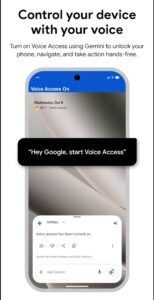
Voice access often requires a wake word (“Hey Google”, “Voice Access On”) — ensuring the system isn’t listening to every conversation.
• User Consent
Apps should request permission for:
- microphone access,
- audio storage,
- cloud processing.
• Data Encryption
Encrypted data transmission and storage are essential.
• Transparency from Developers
Users should know what voice data is stored, how long it’s retained, and who can access it.
Voice Access in the Broader AI Ecosystem
Voice access is part of a larger AI interface evolution:
• Conversational AI
Systems are shifting from command-based to conversation-based interaction, enabling more natural dialogues.
• Multimodal Interaction
Future devices may integrate:
- voice,
- gesture,
- eye tracking,
- brain-computer interfaces,
…for seamless control.
• Smart Environments
Voice control extends beyond phones to:
- TVs,
- appliances,
- vehicles,
- smart homes,
- wearables.
The voice becomes a universal interface.
Designing Effective Voice Access Interfaces
Successful voice access requires thoughtful design:
1. Clear Feedback
Users must know when the system has understood a command.
2. Visible Voice Labels
Apps may overlay numbers on interface elements so users can say “tap 5”.
3. Predictive Prompts
Suggesting common commands improves usability.
4. Error Handling
When misunderstanding occurs, the app should offer corrective suggestions.
5. Accessibility Integration
Full compatibility with screen readers and assistive settings enhances inclusivity.
Voice Access vs. Voice Assistants: What’s the Difference?
Though related, these are distinct:
| Feature | Voice Assistants (e.g., Siri, Alexa) | Voice Access Apps |
|---|---|---|
| Primary Purpose | Answer questions, provide information | Full device navigation & control |
| UI Interaction | Limited | Extensive |
| App Launching | Yes | Yes |
| Typing/Editing Text | Limited | Yes |
| Complex Interaction | No | Yes |
| Accessibility Focus | General audience | Accessibility & hands-free control |
Voice assistants are convenience tools; voice access apps are full control tools.
Emerging Trends in Voice Access
Looking ahead, several trends are shaping the future:
• Multilingual Voice Recognition
Apps can detect and switch between languages fluidly.
• Accent and Dialect Expansion
AI is learning to understand a broader range of voices.
• Gesture + Voice Integration
Voice commands coupled with subtle gestures or eye movement for precision control.
• Emotional Context
Future systems may understand tone, urgency, and intent more deeply.
• Personalized Voice Models
Systems trained specifically on a user’s voice for enhanced accuracy.
Voice Access in Education and Work
Voice access is transforming professional and educational environments:
• Note-Taking & Dictation
Students can take notes simply by talking; professionals can draft documents hands-free.
• Accessibility in Classrooms
Students with motor disabilities gain equal participation ability.
• Voice-Driven Coding
Developers can write code using speech — freeing them from typing.
• Remote Collaboration
Voice commands can control collaboration tools during meetings.
Case Studies: Real Life Impact
Case 1: Empowering Users with Disabilities
A user with quadriplegia who could not touch a phone previously, now communicates with family, manages appointments, and participates in social media via voice access.
App Link
Case 2: Workplace Efficiency
A warehouse manager wearing gloves uses voice access to operate inventory apps without removing protective gear.
Case 3: Driving Safety
A commuter uses voice access to navigate routes and send messages without distraction.
Tips for Getting Started with Voice Access
Whether you’re new or experienced, here are practical steps:
✓ Enable Voice Access on Your Device
Look in accessibility settings on iOS, Android, or Windows.
✓ Train Your Voice Model
Some apps allow voice personalization — use this for better accuracy.
✓ Practice Commands
Start with basic commands and gradually build complexity.
✓ Use Headphones with Microphone
Better audio input improves recognition.
✓ Customize Shortcuts
Define personalized phrases for frequent tasks.
Conclusion: A Future Defined by Voice
The voice access app is more than a convenience — it’s a gateway to greater accessibility, autonomy, and efficiency. As speech recognition continues to improve with AI, voice will become one of the primary modes of human-computer interaction, reducing barriers for people with disabilities and enhancing productivity for everyone.
From opening apps with a whisper to drafting complex documents by dictating naturally, voice access is reshaping the digital landscape. Its influence will only grow, ushering in a world where interacting with technology feels as natural as speaking to a friend.