Set Photo Charging Animation on Your Smartphone
In today’s digital world, smartphone customization has become very popular. People love to personalize their devices with unique wallpapers, themes, widgets, and charging animations. One exciting way to make your phone stand out is by setting a photo charging animation. This feature allows users to display their favorite pictures, custom graphics, or animated effects whenever the phone is connected to a charger.
What Is a Photo Charging Animation?
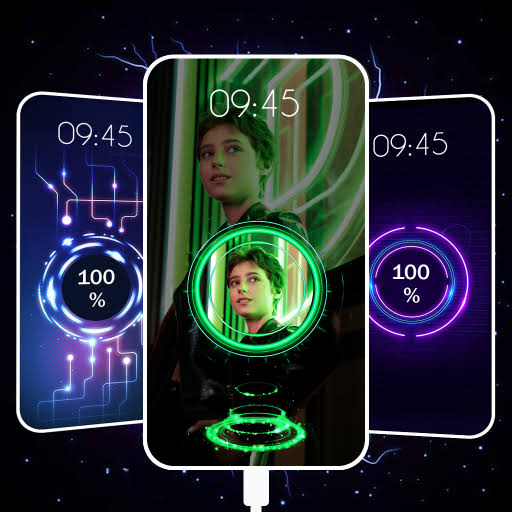
A photo charging animation is a visual effect that appears on the screen when your smartphone starts charging. Instead of seeing the standard charging icon, you can display a personal photo, animated image, or creative charging screen. Many Android applications allow users to create customized charging animations using their own pictures.
These animations make charging more enjoyable and give your device a personalized look. Whether it is a family photo, a favorite celebrity, a pet picture, or a custom design, you can turn it into a charging animation.
Benefits of Using Photo Charging Animations
There are several advantages to setting a photo charging animation on your smartphone:
1. Personalization
Photo charging animations help users customize their phones according to their preferences. Every time the device charges, a unique image appears on the screen.
2. Attractive Appearance
Custom charging screens look more stylish and modern than the default charging indicator. They can make your smartphone feel more premium and visually appealing.
3. Fun User Experience
Watching a favorite photo or animated effect while charging adds entertainment and excitement to everyday phone use.
4. Easy Customization
Most charging animation apps provide simple tools for selecting photos, adjusting effects, and creating custom charging screens within minutes.
How to Set a Photo Charging Animation
Setting a photo charging animation is usually very simple. Follow these general steps:
Step 1: Download a Charging Animation App
Visit the Google Play Store and search for charging animation applications. Choose an app with good ratings and reviews.
Step 2: Grant Permissions
After installation, open the app and allow the required permissions. These permissions help the app detect when the charger is connected.
Step 3: Select Your Photo
Choose a photo from your phone gallery. Many apps allow users to crop, resize, and adjust images for the charging screen.
Step 4: Add Animation Effects
Some applications offer animation effects such as glowing borders, battery indicators, moving particles, and colorful transitions.
Step 5: Save and Activate
Save your settings and enable the charging animation feature. Connect your charger to test the new charging screen.
Popular Features in Charging Animation Apps
Modern charging animation apps offer a variety of useful features:
- Custom photo support
- Battery percentage display
- Animated charging effects
- Neon and LED-style themes
- Live wallpapers
- Full-screen charging screens
- Multiple animation templates
- Easy customization tools
These features allow users to create a charging experience that matches their personality and style.
App Link
Tips for Better Results
To create an impressive charging animation, consider the following tips:
- Use high-quality photos for clear visuals.
- Avoid overly dark images that may hide charging details.
- Select animations that do not consume excessive battery power.
- Keep the design simple and visually appealing.
- Test different effects to find the best appearance.
Conclusion
Setting a photo charging animation is a fun and creative way to personalize your smartphone. It transforms the ordinary charging process into an attractive visual experience. With the help of charging animation apps, users can display their favorite photos, stylish effects, and battery information every time they connect a charger. Whether you want a professional look or a colorful design, photo charging animations offer endless customization possibilities for modern smartphone users.