Set Photo on Charging Animation: Personalize Your Phone While Charging
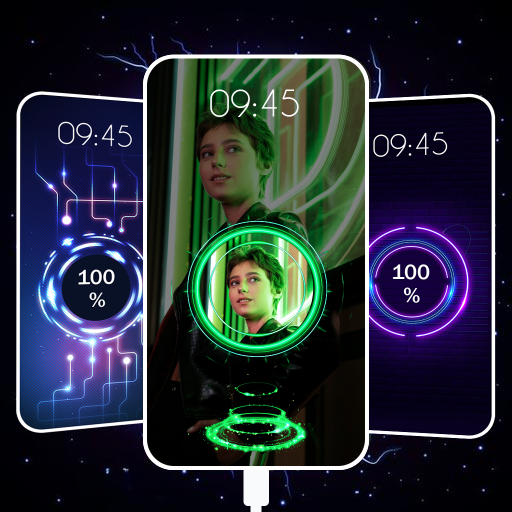
Charging your smartphone is something you probably do every day, but that does not mean the experience has to look boring. Modern Android phones offer many customization options, including charging animations that can make your screen more attractive whenever you connect the charger. One popular feature is the ability to set a personal photo or image as part of a charging animation. This allows you to give your phone a unique appearance while it is charging.
A charging animation is the visual effect that appears on your phone when you plug in a charger. Depending on the device and software, it may show a battery percentage, glowing effects, moving graphics, or other animations. Some customization apps also allow users to add their own pictures, wallpapers, or designs to the charging screen.
What Is a Photo Charging Animation?
A photo charging animation combines your selected picture with a charging effect. Instead of displaying only the default battery icon or animation, your phone can show a customized image while it is connected to power. You could use a family picture, favorite wallpaper, logo, nature image, or any other suitable photo.
The exact appearance depends on your phone model and the customization features available. Some devices may support charging-screen customization directly through system settings, while others may require a compatible third-party application.
How to Set a Photo on Charging Animation
First, check your phone’s built-in customization settings. Open Settings and search for terms such as Charging Animation, Charging Effects, Always-On Display, Lock Screen, or Wallpaper. If your phone supports the feature, you may find several charging animation designs and customization options.
Select a charging animation that supports personalization. Look for an option such as Custom Photo, Gallery, Add Image, or Personalize. Choose the picture you want to use from your gallery and adjust its position if the feature provides editing controls.
After selecting the image, preview the charging animation. Save the changes and connect your charger to test the result. If your device does not offer this feature, you can search for a reputable charging animation application that is compatible with your Android version.
Choosing the Right Photo
For the best results, choose a clear, high-resolution image. A portrait-oriented picture usually works well on smartphones because it can fit the screen without excessive cropping. Bright images can also make the charging animation more noticeable, while darker pictures may create a cleaner and more elegant appearance.
Avoid using very low-quality or heavily compressed photos because they may look blurry when displayed on a large screen.
Benefits of Custom Charging Animations
Personalizing the charging screen is mainly about appearance, but it can also make your phone easier to recognize. A unique charging animation can quickly show that your device is connected to power. It can also make your lock screen and charging experience feel more personalized.
For content creators, a custom image can even include a personal logo or branding. This can be useful when demonstrating a smartphone in videos or creating technology-related content.
Important Safety Tips
Be careful when installing third-party charging animation apps. Download applications only from trusted sources and review their permissions before installation. Avoid apps that request unnecessary access to contacts, messages, files, or other private information.
Also remember that a charging animation does not normally increase charging speed. It is primarily a visual customization feature. Actual charging performance depends on your phone, charger, cable, battery condition, and supported charging technology.
App Link
Conclusion
Setting a photo on a charging animation is an easy way to personalize your smartphone. Whether you choose a favorite picture, wallpaper, or personal logo, the feature can make the charging screen more attractive and unique. If your phone supports custom charging effects, you can usually activate the option through the device’s settings. Otherwise, a trusted compatible customization app may provide additional choices. With the right image and animation, even the simple process of plugging in your charger can become a more personalized smartphone experience.